
TL;DR
- A shared MCP service needs more than a working tool connection. Identity, scoped access, tenant isolation and operational records become part of the design.
- Keep tool descriptions focused, load relevant tools when needed and test selection quality against representative tasks.
- Add a gateway when shared policy and routing justify it. Record failed and denied calls as well as successful ones so your team can reconstruct an incident.
The demo that breaks the moment two people use it
A working MCP prototype tends to look the same everywhere. A server runs as a local subprocess, speaks JSON-RPC over stdin and stdout, and drives an agent that queries the production database and files a Jira ticket on the first attempt. It demos well. That’s the trap, because almost nothing about that setup survives a second user.
The trouble arrives in a predictable order. The server ran as a subprocess on someone’s laptop, so it inherited that person’s credentials and network access, and there was no authentication between client and server because a single local process never needed any. Then two hundred people want it, each with different permissions. Security asks who can call the tool that writes to the database. Finance asks why one team’s runaway agent made ten thousand API calls overnight. Compliance wants a log of which agent touched which customer record, and when. The demo has no answer to any of it, because it never had to.
MCP standardizes how an application discovers and calls external tools. It includes an authorization framework for HTTP-based connections, and teams still need to implement it correctly and add their own action-level policies, tenant isolation and audit records. Those are the parts you build for production, and they are what this article is about. It follows the three concerns AWS Prescriptive Guidance uses to organize the work: tool design, server hosting, and governance. (For why MCP exists in the first place, the companion piece covers it.)
Key distinction
An MCP server proves an integration is possible. An MCP platform makes that integration safe to run for many users, across many tools, under audit. The distance between the two is the actual project.
What this article covers
- Why tool design is a performance decision, with concrete rules for naming, granularity, and size.
- How tool descriptions eat into the context window, and how to keep the surface small.
- Where identity, scoped tokens, and authorization belong once servers go remote and shared.
- What a gateway does, and when it’s worth running one.
- Which failures have already happened in the wild, and a sane order to build in.
An MCP server is not an MCP platform
The gap between the two is made of the parts a demo gets to skip. A platform serves many tenants, so it needs identity and per-user authorization. It runs continuously, so it needs logging, tracing, and versioning. It’s shared, so one team’s mistake can’t be allowed to starve everyone else, which is what rate limits and load shedding are for. A local integration does not establish tenant isolation or per-user access control. Those properties need explicit design and testing when you share it.
Design rule
Read the three concerns as a checklist. Tool design drives accuracy and cost. Hosting drives access control (local, remote, or gateway). Governance drives safety and audit: scoped tokens, rate limits, tool-selection metrics, versioning. (For how those controls fit together as a layer, see what MCP governance is.) A prototype can ignore two of them; a platform can’t.
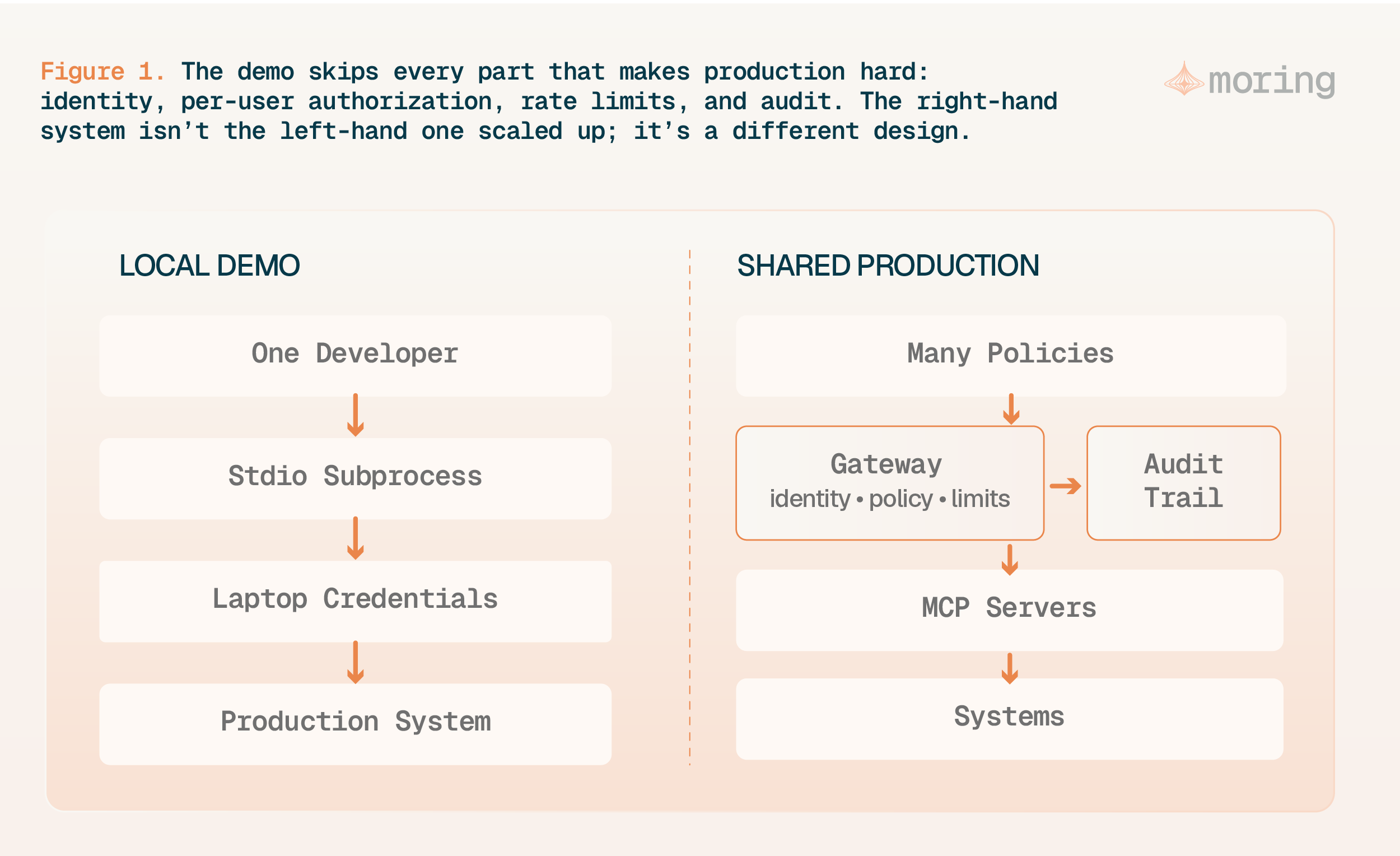
Figure 1. The demo skips every part that makes production hard: identity, per-user authorization, rate limits, and audit. The right-hand system isn’t the left-hand one scaled up; it’s a different design.
API-shaped tools versus workflow-shaped tools
Exposing a REST API one-to-one as MCP tools is the usual first mistake. The guidance names a tension that cuts both ways: too few tools and the model can’t gather what it needs, too many and it loses track of which tool to pick and in what order, which surfaces as hallucinated calls. Map every endpoint to its own tool and you land on the “too many” side without trying.
Tools shaped around workflows do better, because they hand the model a result instead of a kit of parts. One orders_summarize_for_customer tool that does the joins and returns the answer removes four decisions the model would otherwise get wrong. The guidance points to peer-reviewed work: structured tool wrappers came out roughly three times more accurate on database tasks than direct API access, and following the tool-design recommendations moved task accuracy by 28 to 32 percent. Both figures are AWS summarizing external research rather than its own measurements, so read them as direction, not promises.
Design rule
Scope tools to workflows, not endpoints. Name them so a sort groups related operations, domain-noun-verb style: github_issue_create, github_pullrequest_merge. Keep the parameter count near eight or below, write each description as if it were a prompt (purpose, when to use it, output, errors), and split a server once it crosses roughly fifty tools. Separate read and write servers when you want authorization to differ by side.
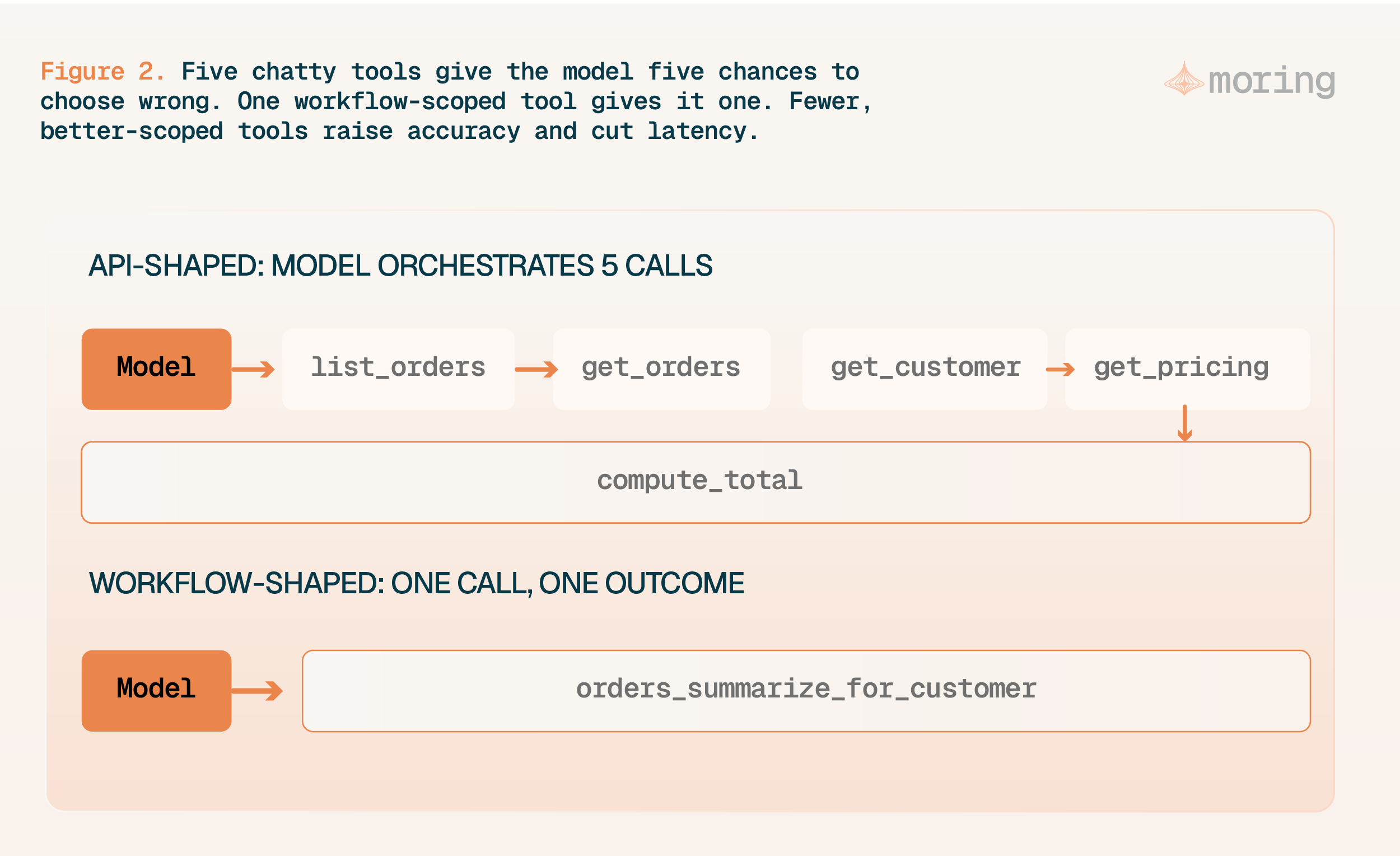
Figure 2. Five chatty tools give the model five chances to choose wrong. One workflow-scoped tool gives it one. Fewer, better-scoped tools raise accuracy and cut latency.
Every tool description competes for context
Tool definitions aren’t free. The model reads every registered tool’s name, description, and schema on every call, and that text lands in the same context window your reasoning needs. The guidance puts numbers on it: a typical definition runs 250 to 500 tokens, so twenty tools burn five to ten thousand tokens before the model has even read the question.
That cost compounds. Large tool catalogs can create prompt bloat, since the more servers you connect, the more the descriptions crowd out reasoning and the worse tool selection gets. The MCPGAUGE evaluation, about twenty thousand API calls and over six thousand dollars in compute, found MCP integration adds heavy input-token overhead, and it defines a metric, Overhead, to track that alongside proactivity, tool correctness, and effectiveness. The tools that make an agent capable are the same ones running up its bill.
Load tools on demand, not all at once
If descriptions are the cost, stop paying for tools the model doesn’t need this turn. The guidance lays out three approaches. Static definition ships a hand-picked set, cheap and predictable but brittle when needs shift. Dynamic discovery registers everything, flexible but growing context linearly with tool count, so it falls over past a few dozen. A search function is what scales: index every tool’s description, then at query time pull back only the handful that match, the same move RAG makes for documents.
The payoff is measurable. RAG-MCP, which applies retrieval to tool selection, lifted tool-selection accuracy from 13.62 percent to 43.13 percent against a large tool pool while cutting average prompt tokens from about 2,134 to 1,084, roughly half. Managed gateways are starting to ship this: Amazon Bedrock AgentCore Gateway exposes a native semantic search over tools, so an agent can reach thousands of them without loading every description at once.
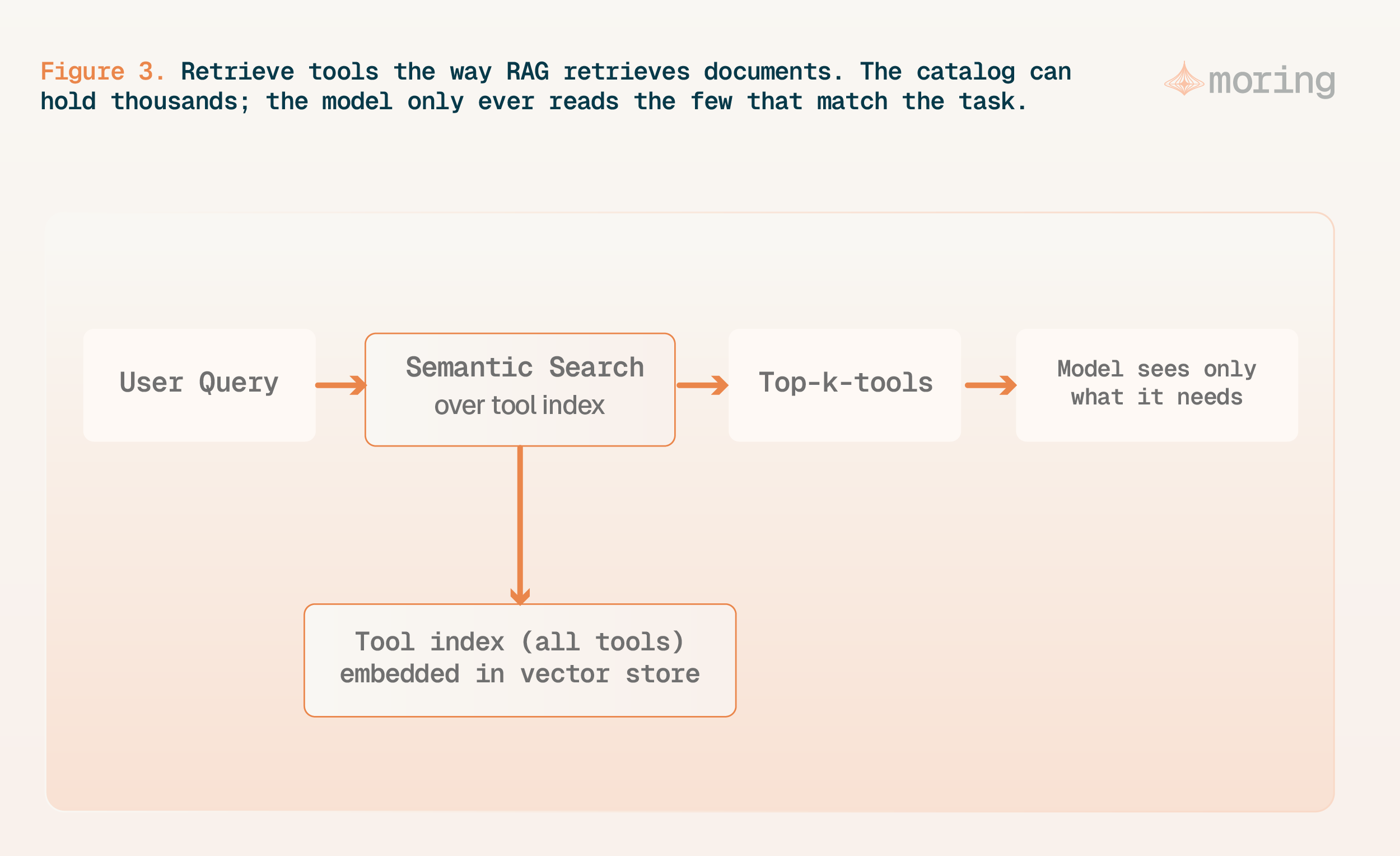
Figure 3. Retrieve tools the way RAG retrieves documents. The catalog can hold thousands; the model only ever reads the few that match the task.
Local, remote, and gateway hosting
The guidance gives three places to run a server, and each one shifts what you’re responsible for. The local server is the demo setup, fine for a coding assistant, but with no client-server auth and a copy per user that needs a registry to distribute. A remote server runs over HTTP, which is where central access control, authentication, and versioning become possible, and where multi-tenant identity becomes your new problem. A gateway sits in front of everything as one endpoint, handling authentication, authorization, routing, and protocol translation, so you can add servers or tools behind it without touching clients.
A gateway is not a requirement for every deployment. It earns its place as servers and tools go remote, shared, multi-user, or centrally governed, and before that it’s overhead: for one team and one server, it’s a box you pay to run for nothing. Once you have a dozen teams, a hundred tools, and an auditor who wants a single answer to “who can call what,” it becomes the difference between policy you enforce and policy you only wrote down. AgentCore Gateway and Docker’s MCP Gateway are two current takes on the pattern; the shape matters more than the brand.
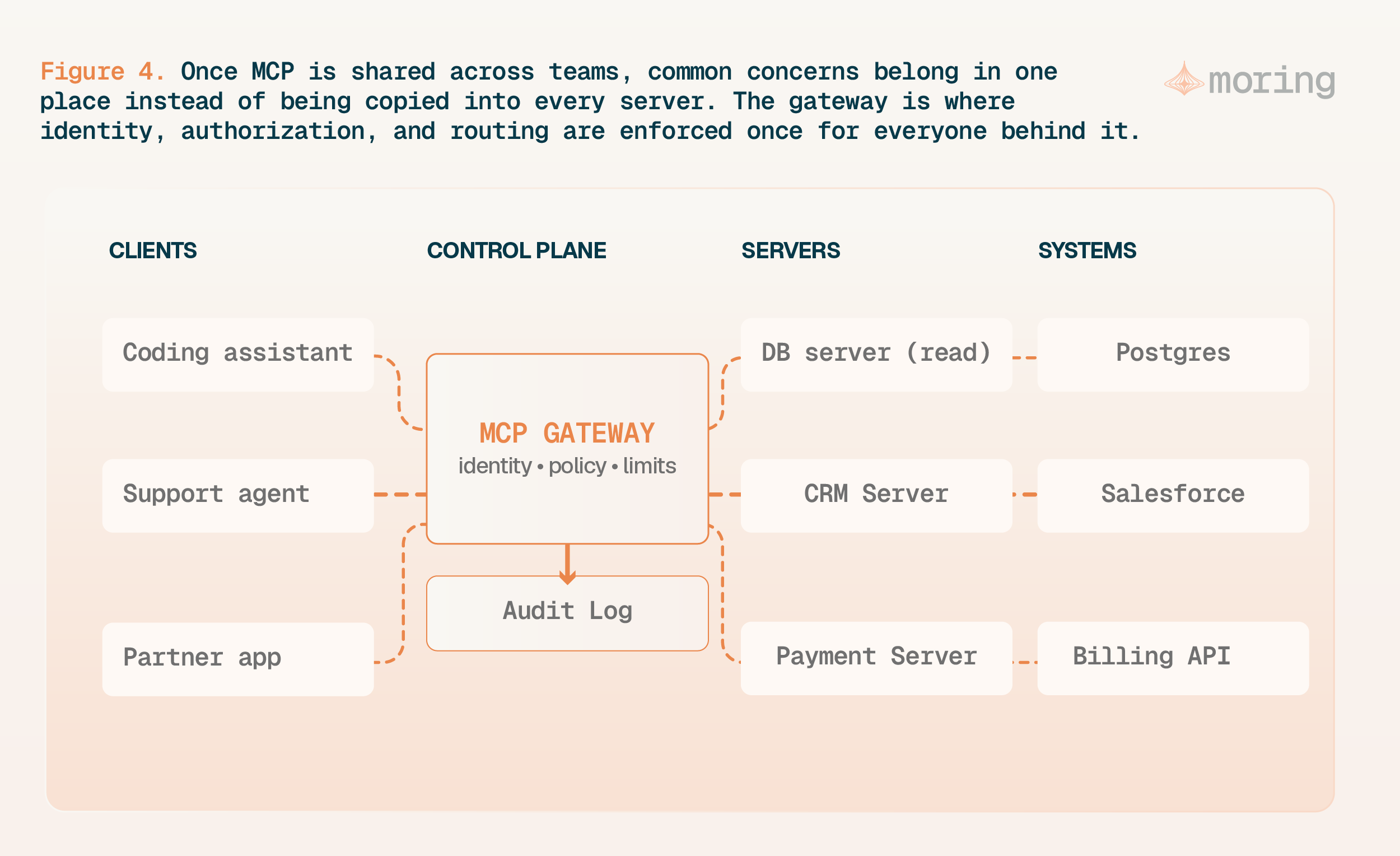
Figure 4. Once MCP is shared across teams, common concerns belong in one place instead of copied into every server. The gateway is where identity, authorization, and routing are enforced once for everyone behind it.
Authentication and authorization are separate problems
The most dangerous shortcut in the stack lives right here. Two access patterns are worth designing for up front: machine-to-machine, where no user is in the loop, and user-delegated, where a person authorizes the agent to act for them. The tempting move is to take the token the user signed in with and pass it straight through to every downstream system. Don’t. User credentials shouldn’t propagate through the agent chain; downstream calls should carry explicitly scoped, purpose-built tokens, one per tool, so none can borrow another’s reach.
Production warning
Never propagate the caller’s token to downstream services. Mint scoped, purpose-built tokens per tool, check that the token’s aud (audience) matches the service receiving it, and isolate tokens per server. AWS positions AgentCore Identity as the component that handles this token isolation for both machine-to-machine and user-delegated access.
The guidance’s worked example makes the stakes plain. An admin asks an agent to clone the production database, which needs read and create rights and nothing more. If the agent carries the admin’s token and the model decides, wrongly, to drop a table, the call goes through, because the token allowed it. Give the agent a token scoped to read and create, and the same hallucinated delete fails harmlessly. Least privilege here isn’t a compliance box to tick; it’s what turns a model’s mistake into a shrug. The protocol backs this directly. MCP added an OAuth 2.1 authorization framework for HTTP transports in March 2025, and the June 2025 revision made the server an OAuth resource server and required resource indicators (RFC 8707), so a token minted for one server can’t be replayed against another.
The failures are already in the wild
Runtime policy decides what’s allowed right now, for this user, this data, this context. Written as policy-as-code and checked on every call, it lets you change the rules without redeploying servers. Some actions shouldn’t run on the model’s judgment at all, and the spec itself calls for human confirmation on tool calls with side effects. Published vulnerability reports show how these failures can happen. CVE-2025-6514 was a command-injection flaw in the mcp-remote proxy, rated CVSS 9.6, that allowed remote code execution when a client connected to a malicious server. Indirect prompt injection, plants instructions in outside content: ask an agent to “check open issues” and a booby-trapped issue can steer it into reaching private repositories. Tool poisoning hides instructions in a tool’s own metadata, including rug-pull redefinitions that change a tool’s behavior after you’ve approved it. The defenses are ordinary platform hygiene: sanitize inputs, sandbox servers, confirm side effects with a human, and audit a server before it reaches production.
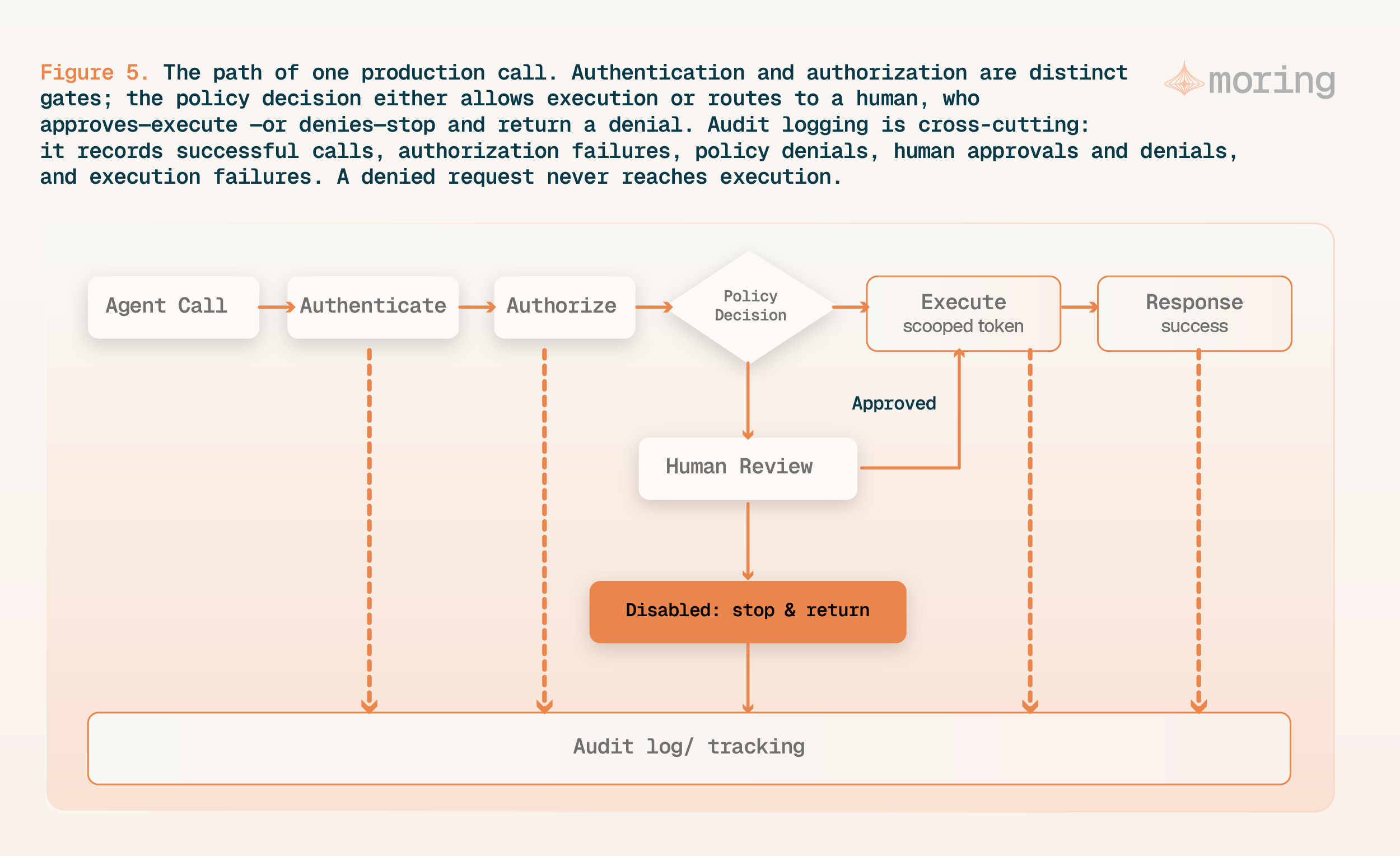
Figure 5. The path of one production call. Authentication and authorization are distinct gates; the policy decision either allows execution or routes to a human, who approves (execute) or denies (stop and return a denial). Audit logging is cross-cutting: it records successful calls, authorization failures, policy denials, human approvals and denials, and execution failures. A denied request never reaches execution.
What to monitor, rate-limit, and audit
Day-two operations need what the demo never produced. The guidance names the metrics that predict trouble: token usage, tool-selection accuracy, how many tools an agent has registered, and tool latency, with alarms on per-tool output-token thresholds to catch context-window overuse early. Guard shared capacity at two levels, coarse per-server limits so one tenant can’t starve the rest and tighter per-tool limits pinned to the slowest downstream API, and return standard X-RateLimit headers and shed load when you’re over budget. To catch regressions before users do, some AWS teams build golden datasets from historical API logs and test tool selection against them on every change.
One benefit comes close to free. Because MCP provides a defined interface with named inputs and outputs, you have a consistent place to add instrumentation that can show which agent touched which data, under what permission, and when. That record exists only if you capture the relevant identities, permissions and results. MCP traffic alone does not create a complete audit trail.
A phased path from laptop to platform
You don’t need the whole platform on day one. You need to know which stage you’re at, and what the next one asks of you.
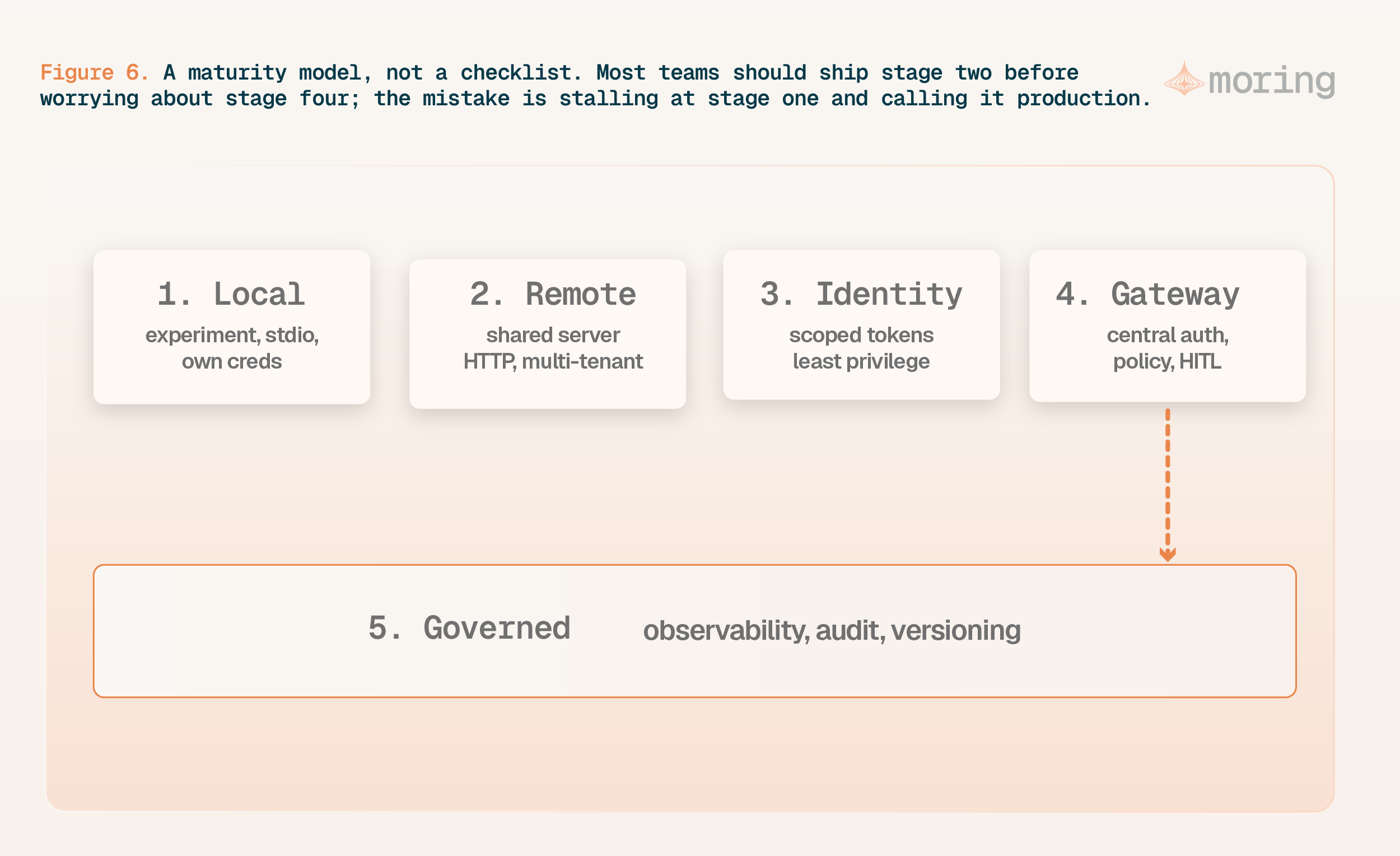
Figure 6. A maturity model, not a checklist. Most teams should ship stage two before worrying about stage four; the mistake is stalling at stage one and calling it production.
Each stage earns the next. A remote server is worth building once more than one host needs it. Scoped identity gets urgent the moment real user data comes within reach. A gateway pays off when the number of servers and teams makes per-server controls unmanageable. Assign ongoing ownership for that infrastructure, including changes to tools, access rules and protocol versions.
Treat the MCP layer like production infrastructure
The distance between a demo and a platform isn’t a smarter model or a better prompt. It’s the work the demo skipped: tool designs that fit the context window, tokens scoped so a wrong call fails safe, policy you can change without a redeploy, and enough logging to reconstruct what happened. None of it is exotic. It’s the operational discipline you’d bring to any shared service that touches production data, applied to a layer that happens to take its orders from a model. Where that discipline is enforced as governance, see the Moring AI Governance hub.
So run it like one. Version it, watch it, and decide ahead of time which actions need a human on the button. Add a gateway when the layer is genuinely shared, and not before. Moring’s AI Control Plane works in this space, between an agent’s intent and its authority to act, because that’s where the failures that matter tend to show up.
Sources and further reading
- AWS: Model Context Protocol strategies. Public implementation guidance organized around tool design, hosting and governance.
- AWS: MCP tool design strategy and tool discovery. Design recommendations and summaries of external research, not guarantees for your workload.
- AWS: MCP hosting strategy and governance strategy. Guidance on shared hosting, scoped identity, load controls and monitoring.
- Help or Hurdle? Rethinking Model Context Protocol-Augmented Large Language Models. MCPGAUGE research; benchmark overhead depends on the evaluated models, tools and tasks.
- RAG-MCP: Mitigating Prompt Bloat in LLM Tool Selection via Retrieval-Augmented Generation. Research results for the authors’ tool-selection benchmark, not universal production outcomes.
- MCP: Authorization, 2025-06-18. Versioned reference for the authorization changes discussed here. See also the 2026-07-28 changelog before implementing a newer revision.
- MCP: Tools, 2025-11-25 and security best practices. Official implementation and user-control guidance.
- NIST National Vulnerability Database: CVE-2025-6514. Public vulnerability record for the mcp-remote command-injection flaw.
- Invariant Labs: GitHub MCP exploitation. Original security-research report on indirect prompt injection.
Editorial note: The demo-to-platform framing and phased rollout are Moring’s recommendations. Benchmarks, vendor guidance and vulnerability reports are identified separately above. Protocol behavior is version-dependent; the historical authorization discussion is not a claim that the 2025 specification is the latest revision.
Frequently asked questions
What is the difference between an MCP server and an MCP platform?
How many tools should an MCP server expose?
Should you pass the user token through to downstream MCP tools?
When do you need an MCP gateway?
What are the main MCP security risks in production?
Governing Autonomous AI Agents in Production
Moring provides the runtime control layer, identity verification, human-in-the-loop approvals, and audit records needed to deploy production-grade AI agents safely.
About the author

Vignesh NagarajanAI Engineer, Moring AIAtlanta
Builds AI models and benchmarks across NLP, speech and computer vision for production applications. Works on the evaluation and measurement side of agent deployments. Writes about what actually holds up when an agent meets real traffic.
LinkedIn profile