

TL;DR: A coding agent is governed when four things are true: it has its own identity rather than a developer’s token, its write access stops at a pull request, the merge and release gates that apply to people apply to it with no bypass, and every change it made can be traced back to the person who asked for it. A broadly scoped personal token can undermine these boundaries when code review is the only remaining control.
AI coding agents now open pull requests, fix failing tests, upgrade dependencies and refactor across repositories. These agents act as privileged automation in the software supply chain. Governing them means deciding what they may reach, who approves what they produce, and what evidence remains afterwards.
The scope here is the permission boundary and the evidence. Whether your developers follow your AI coding policy is a separate problem with separate measurements.
Key takeaways
- Give the agent its own credential. A shared or personal token makes attribution harder to establish from repository history alone.
- Let the agent write to a branch and open a pull request. Keep it off the list of identities that can bypass rules.
- Merge and release authority stays with people, and the record should show which person.
- Treat workflow files, CI configuration and infrastructure code as a stricter tier, because editing them changes what runs with your secrets.
- Widen access one rung at a time, and test each rung by trying to break it.
1. The agent needs its own identity
If an agent authenticates as a developer, every change it makes looks like that developer’s work. You lose the ability to answer two questions that matter later: which changes came from an agent, and which person asked for this one.
What to set up instead: a distinct machine identity for the agent, scoped to the repositories it needs, with the human requester recorded on each run. That gives you a join between the person, the request, the agent’s actions and the resulting commits. Without it, an agent-caused incident becomes an investigation into a developer who was not at their desk.
This is the same identity problem other agent workflows face, which is why the credential belongs somewhere central rather than inside each tool that happens to need one.
2. Write access stops at the pull request
The useful boundary is simple to state: the agent can create branches and open pull requests, and it cannot push to a protected branch or merge.
On GitHub, rulesets are where that boundary lives. They control who can push commits to a given branch, and they carry a bypass list, which can include roles, teams and GitHub Apps (about rulesets). Two practical notes follow from how that works. Your agent’s identity should not be on the bypass list, and it is worth checking, because an app added for convenience during a trial tends to stay. Where several rulesets target the same branch, the most restrictive version of a conflicting rule applies, which means you can layer an agent-specific ruleset on top of your existing protection rather than editing the rule everyone depends on.
Other repository hosts require their own configuration and verification. The principle to carry across: the agent’s permissions are set where branch protection is set, not inside the agent’s own configuration, because the agent cannot be relied upon to enforce a boundary it has permission to modify.
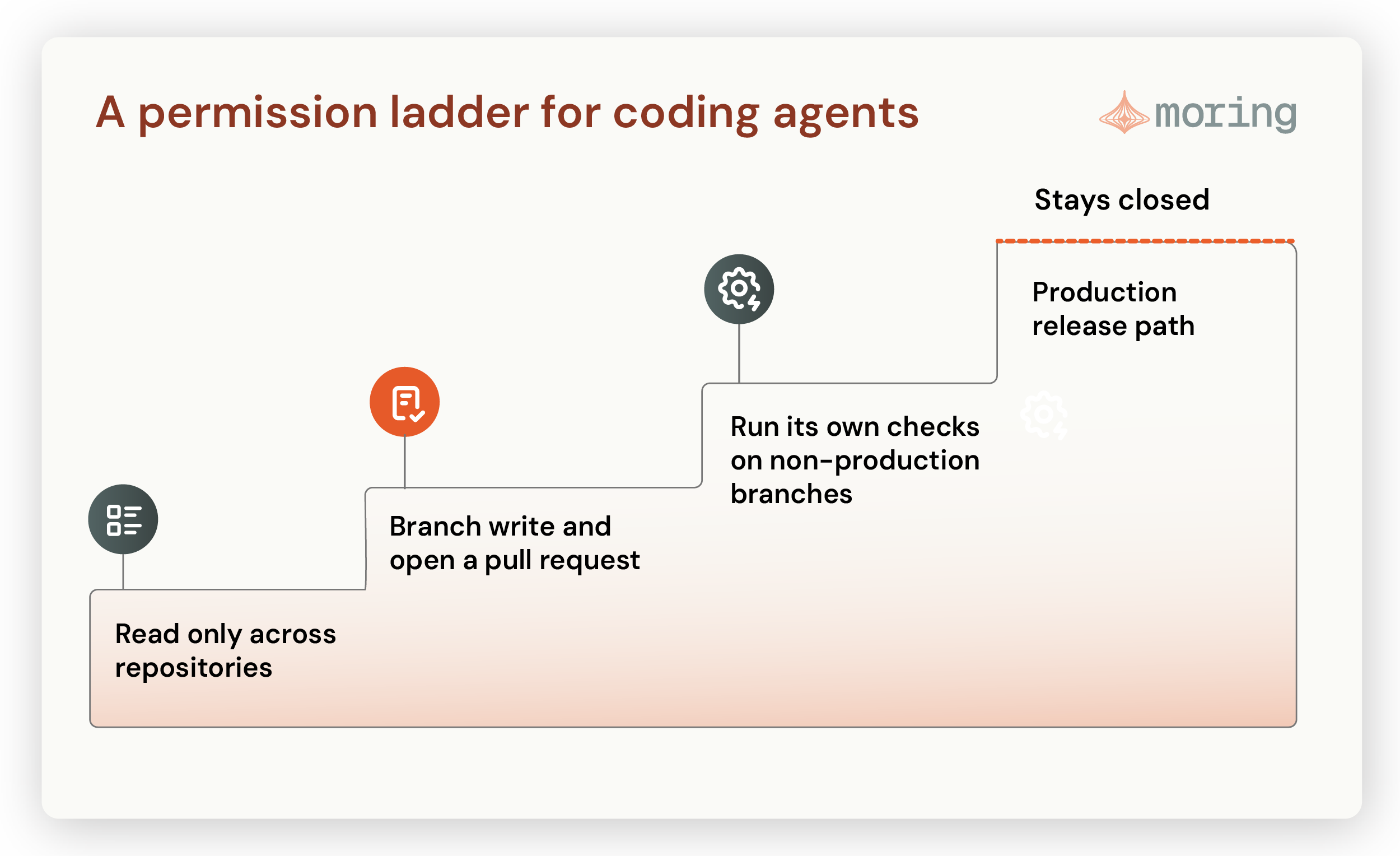
3. Merge and release authority stays with people
A reviewer approving an agent’s pull request is doing the same job as a reviewer approving a colleague’s, with one difference: the agent can produce more changes than a team can carefully review. When the queue fills with plausible-looking pull requests, review capacity can become the bottleneck.
Two controls help more than adding reviewers.
Scope the change size. Narrow pull requests are easier to review thoroughly. Large refactors increase the review burden, so set change-size limits that match your team’s capacity.
Ask for build provenance on anything that ships. The SLSA framework describes build levels: L1 expects provenance that documents how an artifact was built, L2 adds a hosted build platform with signed provenance, and L3 adds hardened builds that isolate signing secrets from user-defined build steps (SLSA build levels). For agent-generated code, the value is in being able to show which build produced the artifact in production and what went into it, which is exactly the question that follows an incident.
4. Workflow files, CI configuration and infrastructure code are a stricter tier
Repository write access may include the files that define what runs in your pipeline. If those workflows receive credentials, edits to their definitions deserve separate scrutiny.
GitHub’s own guidance sets out how secrets reach a workflow and where the exposure sits: with the exception of the default token, secrets are not passed to the runner when a workflow is triggered from a forked repository, secrets are not automatically passed to reusable workflows, they are not available to Dependabot-triggered workflows, and values that are not GitHub secrets have to be masked deliberately (using secrets in GitHub Actions).
Read that as a design instruction. The protections assume the workflow definition itself is trustworthy. An agent that can change a workflow file can change what executes with your secrets, so those paths need a stricter gate than application code: required review from a named group, and no agent identity in the bypass list. The same applies to infrastructure code and anything that grants access.
5. The evidence to keep
For each change an agent made, someone should be able to answer these from records.
| Question | Where the evidence should live |
|---|---|
| Which person asked for this change? | The agent run record, joined to the commit or pull request |
| What did the agent do, step by step? | The agent's action log: files read, tools called, commands run |
| What model and prompt version produced it? | The run record, versioned alongside the code |
| Who approved the merge? | The pull request review, with the approver's identity |
| What shipped, and from which build? | Release provenance for the artifact in production |
| What could the agent reach at the time? | The credential scope and ruleset state on that date |
The last row is the one that gets lost. Permissions change quietly, and six months later nobody can say what access the agent held when a given change was made. Recording the scope at the time of the run is a small piece of work that saves an expensive reconstruction.
Moring’s AI-DLC is built around that table. It authorizes which repositories, models, documentation and tools a developer or agent can reach for a defined change, then keeps one reviewable record from request to release: who asked, what the agent used, which checks ran, and what shipped. What changes is the review. Instead of reconstructing what an agent touched from commit history and someone’s memory, the record exists at the time the change is made. That is the thing a security team asks for before it will let an agent open pull requests against a production repository at all.
6. Test each rung before you widen it
Before granting the next level of access, try to break the current one. Four tests worth running:
- Can the agent merge? Attempt it with the agent’s own credential, not a developer’s.
- Can it change its own permissions? Have it open a pull request that edits a ruleset, a CODEOWNERS file or a workflow that grants access. Test whether the agent can modify these controls; the change should not take effect without the required human approval.
- Can it reach production directly? Check network egress and credentials from wherever the agent runs, rather than reading the intended design.
- Can instructions in its inputs redirect it? An agent that reads issues, tickets and dependency changelogs is reading text other people wrote. Test what happens when that text contains instructions.
Run those tests in an isolated environment with test credentials and retain the results for security review.
This is where a control plane earns its place in a coding workflow. Moring’s AI Control Plane issues the agent its own scoped, short-lived credential, records the person who asked for each run alongside what the agent did, and holds the policy that decides which repositories and tools it can reach, so those answers come from one place rather than from each team’s own scripts. It runs in your cloud or your own data center.
The same staged approach shows up in operations, where graduated authority for AIOps agents widens what an agent may touch one rung at a time.
Here is the version to take into your next security review. Your coding agent has its own credential, it can open a pull request and go no further, a person merges, and you can show who asked for any change it made. Four sentences. If you cannot say all four about the agent already running against your repositories, that is where the work is, and a coding agent’s reach grows quietly in the meantime: taking MCP to production covers how that happens on the tool-access side.
Frequently asked questions
What is an AI coding agent?
A coding agent is a system that takes a development task, works across a codebase, and produces changes: branches, commits, pull requests, test fixes, dependency upgrades. It differs from an autocomplete assistant in that it takes multiple steps on its own and uses tools such as a shell, a test runner and a version control system, which is why it needs permissions and an audit trail rather than just a license.
Should an AI coding agent be able to merge its own pull request?
No, as a default. Merging is where a change enters the path to production, and it is the cheapest place to keep a person. If a team wants some merges automated later, the sensible version is a narrow class of change defined in advance, such as a dependency patch that passes a fixed set of checks, with the same provenance and record as any other release.
What permissions should a coding agent have in a production repository?
Read access to what it needs, write access limited to its own branches, permission to open pull requests, and no membership in any group that can bypass branch rules. Workflow files, CI configuration and infrastructure code should sit behind a stricter review requirement than application code, because changing them changes what runs with your credentials.
How do you attribute a change an agent made?
Give the agent its own credential and record the human requester on each run, then join that record to the resulting commits and pull request. If the agent authenticates as a developer, attribution becomes much harder to establish reliably from the repository history alone.
What should you record for each agent change?
The requester, the agent’s step-by-step actions, the model and prompt version, the reviewer who approved the merge, the build that produced the shipped artifact, and the agent’s credential scope at the time of the run. The last one is the item teams most often discover they need and do not have.
Sources
- GitHub, about rulesets, for who can push, the bypass list including GitHub Apps, and most-restrictive-rule-wins
- SLSA v1.2, build track, for provenance at L1, signed provenance on a hosted platform at L2, and hardened builds at L3
- GitHub, using secrets in GitHub Actions, for fork behavior, reusable workflows, Dependabot and masking